
The Best Magento 2 Reorder Extensions: Streamlining Repeat Purchases

For any e-commerce business, the most valuable customer is the one who returns. Statistics consistently show that it costs significantly more to acquire a new customer than to retain an existing one. In the world of Magento 2 (Adobe Commerce), providing a seamless “reorder” experience is one of the most effective ways to boost Customer Lifetime Value (CLV) and reduce cart abandonment.

While native Magento 2 includes a basic “Reorder” button within individual orders, it is often insufficient for modern shoppers. Customers frequently want to buy specific items from multiple past orders, search their purchase history, or add items in bulk without navigating through several pages.

This guide explores the best Magento 2 Reorder extensions to help you transform a clunky process into a conversion-driving machine.

Top 5+ Reorder Extensions for Magento 2 Stores

BSS Commerce Reorder Product List

BSS Commerce offers a robust solution designed to handle heavy lifting. Their Magento 2 Reorder Product List is built for efficiency, specifically helping customers who have long, complex purchase histories.

Key Features:
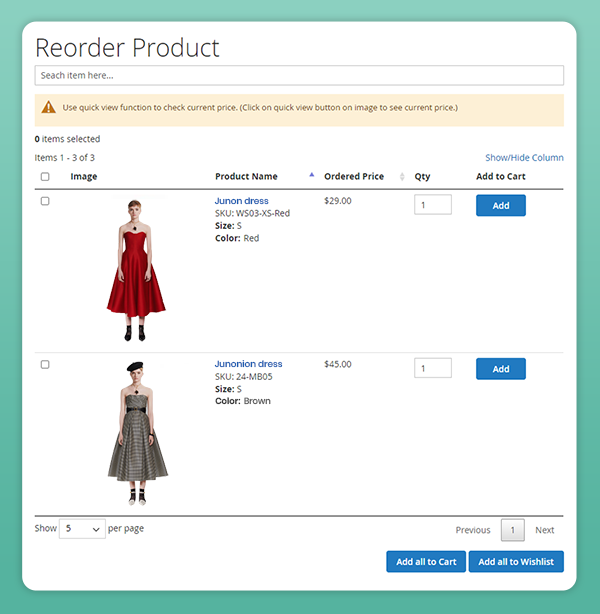
  • Dedicated Reorder Tab: Adds a clearly labeled section in the customer account area for all past purchases.
  • Smart Search & Filtering: Includes a search bar that allows users to find past products by SKU or name—essential for stores with hundreds of SKUs.
  • Attribute Filtering: Customers can filter their past purchases by attributes like color, size, or price to narrow down exactly what they need to replenish.
  • Mass Action Capability: A “Select All” feature and “Add All to Cart” button significantly reduce the time spent on repetitive tasks.

magento 2 reorder product tab

Best For: Hybrid B2B/B2C merchants. If your customers tend to have purchase histories spanning dozens of pages, the search and filter functionality of this extension is a must-have.

Aheadworks Easy Reorder

Aheadworks is renowned for high-quality code and intuitive UX, and their Easy Reorder extension is no exception. It targets the friction points of the standard Magento account dashboard by introducing a dedicated “My Previous Purchases” tab.

Key Features:

  • Centralized Purchase Grid: Instead of digging through order IDs, customers see a flat list of every product they have ever bought.
  • Data-Driven Sorting: Shoppers can sort their history by the number of times an item was ordered or the date of the last purchase.
  • Bulk Add-to-Cart: Customers can use checkboxes to select multiple items from their history and move them to the cart in one click.
  • On-the-Fly Configuration: If a customer previously bought a “Blue Large” shirt but now wants “Red Medium,” the extension handles product options via redirects or popups, ensuring no technical errors during the reorder process.
  • Developer Friendly: Full API and GraphQL support make it a great choice for headless commerce setups or PWA integrations.

Magento 2 Easy Reorder | Reorder Product List extension for Magento 2

Best For: Stores that prioritize a clean, professional UX. It is ideal for B2C brands with loyal followings and B2B stores that want an organized, grid-based history for their clients.

MageAnts Reorder Specific Product

If you are looking for a straightforward, lightweight solution that doesn’t overcomplicate the user interface, MageAnts Reorder Specific Product is an excellent contender. It focuses on the “quick win”—getting the customer from the dashboard to the checkout as fast as possible.

Key Features:

  • Simplified History View: Presents a streamlined list of products ready for immediate reorder.
  • One-Click Actions: Minimized steps to move products from the history list to the shopping cart.
  • Pagination & Search: Even though it is lightweight, it still offers essential navigation tools like pagination to keep the account page loading quickly.
  • Universal Compatibility: Works seamlessly with simple, configurable, grouped, and bundled products.

Best For: Small to medium-sized retail sites with smaller catalogs where customers frequently come back for the “usual” items. It’s a “set-it-and-forget-it” tool that improves UX without a steep learning curve.

LandOfCoder Magento 2 Reorder Product

LandOfCoder provides a feature-rich extension that essentially replaces the default Magento reorder workflow with a more “intelligent” version. This extension is particularly strong in its ability to handle complex product types and bulk actions.

Key Features:

  • Advanced Replacement UX: It doesn’t just add a tab; it upgrades the entire logic of how reordering works in the customer dashboard.
  • Quick View Integration: Customers can click a “Quick View” popup to verify product details or change options (like size/color) without leaving the reorder page.
  • Flexible Bulk Selection: Allows for highly granular control over which items and quantities are being added back to the cart.
  • Performance Optimized: Designed to handle large volumes of data without slowing down the customer account section.

Best For: Merchants who want total control over the reorder experience. It is particularly effective for B2B stores where buyers need to verify technical specs via Quick View before repurchasing.

MageHQ Reorder Product for Magento 2

MageHQ offers a balanced extension that mimics a “marketplace” feel. It is designed to make the reorder page feel like a personalized shopping mall for the customer, containing only the things they already know and love.

Key Features:

  • Account Dashboard Integration: Seamlessly blends into the native Magento 2 look and feel.
  • SKU/Name Search: Fast AJAX-based search within the reorder list to find specific items instantly.
  • Quick View Support: Reduces the need for page reloads by allowing customers to preview items.
  • Mass Add-to-Cart: Streamlined checkboxes for selecting multiple SKUs simultaneously.

User Guide - Magento 2 Reorder Product Extension

Best For: Mid-to-large sized stores that want a professional, integrated look that feels like part of the original Magento core but offers significantly more utility.

Quick Order & Bulk Order Extensions

While not strictly “Reorder” extensions (which rely on past history), Quick Order modules (like those from BSS Commerce) are often used in tandem with reorder tools to serve the same goal: speed.

Key Features:

  • SKU Direct Entry: Customers can type in a list of SKUs and quantities to add them to the cart instantly.
  • CSV/Excel Import: For wholesale buyers, uploading a spreadsheet of 50 items is faster than clicking “reorder” on 50 separate products.
  • AJAX Auto-suggest: As the user types a SKU, the product image and name appear instantly.

Best For: Wholesale and B2B merchants. If your repeat customers are professional buyers who keep a list of SKUs in an external file, a Quick Order extension is the perfect companion to a Reorder extension.

How to Choose the Right Reorder Extension

With several high-quality options available, choosing the right one depends on your specific business model and customer behavior. Use the following criteria to make your decision:

  • Decide Based on Customer Type
    • B2C (Casual Buyers): Focus on Aheadworks or MageAnts. These customers value a clean, visual, and simple interface. They likely aren’t buying 50 items at once; they just want to find that one specific moisturizer or coffee blend they bought last month.
    • B2B (Professional Buyers): Look at BSS Commerce or LandOfCoder. These users need efficiency, search filters, and bulk actions. They view the reorder page as a tool, not a shopping experience.
  • Bulk Reordering Needs: Assess how many items your average repeat customer buys. If the average repeat order contains more than 5 items, you must have a “Mass Add to Cart” feature and a search bar. If they usually only buy one or two things, a simpler list view will suffice.
  • UX and Navigation: Friction is the enemy of conversion. Look for extensions that offer:
    • Quick View Popups: To avoid navigating away from the list.
    • Image Thumbnails: To help customers visually identify products.
    • Sortable Columns: So users can find their most-ordered items at the top.
  • Integration with Other Tools: If you are a wholesale-heavy business, consider whether the reorder extension can work alongside a CSV Import or Quick Order by SKU module. Providing multiple “fast tracks” to the checkout ensures that every type of buyer is accommodated.
  • Compatibility and Support: Always verify:
    • Magento Edition: Does it support both Open Source and Adobe Commerce?
    • PHP Version: Is it compatible with your current server environment (e.g., PHP 8.1/8.2)?
    • Theme Compatibility: Will it work with custom themes like Hyvä or Porto without extensive CSS customization?

For small Magento stores with limited technical resources, extensions like this provide the biggest ROI by improving repeat purchases without adding operational complexity. Choosing lightweight, easy-to-maintain modules is often more impactful than deploying feature-heavy enterprise solutions.
👉 Explore the best Magento 2 extensions for small stores to build a streamlined, scalable eCommerce stack.

Final Thoughts

Magento 2 reorder extensions play an important role in improving convenience, speeding up repeat purchases, and creating a smoother shopping experience—especially for stores with returning customers or frequent bulk orders. Depending on how customers shop, these solutions help reduce unnecessary steps, make previous purchases easier to access, and support more efficient order management. By enhancing the default Magento reorder capability, they contribute to better user experience, higher satisfaction, and stronger long-term customer relationships.

To maximize sales performance, merchants should also invest in complementary tools that enhance conversion, upselling, and customer engagement across the entire shopping journey.
👉 Explore the top must-have Magento 2 extensions that boost sales to build a high-performing and scalable Magento store.

Leave a Reply

Your email address will not be published. Required fields are marked *