In the competitive landscape of e-commerce, organic search visibility is the lifeblood of sustainable growth. For Magento 2 (Adobe Commerce) merchants, the platform’s native SEO capabilities, while functional, often fall short when managing large-scale catalogs or complex site architectures. This is where the Amasty Magento 2 SEO Toolkit Pro enters the frame.
Positioned as a mid-to-high-tier solution within Amasty’s ecosystem, the Pro version is designed to bridge the gap between basic optimization and enterprise-level automation. This review explores whether this $379/year investment is the right engine for your store’s growth.
What Is Amasty Magento 2 SEO Toolkit Pro?
The Amasty SEO Toolkit Pro is a comprehensive, all-in-one extension suite that consolidates nearly a dozen different SEO functionalities into a single interface. Rather than juggling multiple standalone modules for sitemaps, redirects, and meta data, Amasty provides a unified dashboard to manage the “technical health” of a Magento store.
The Strategic Objectives
The suite is built around four primary pillars:
- Driving Organic Traffic: By optimizing on-page elements that search engines prioritize.
- Reducing Manual Workload: Using templates and AI to handle tasks that would otherwise take hundreds of man-hours.
- Improving Indexation: Ensuring Google and Bing crawl the right pages and ignore the “noise” (duplicate content).
- Scaling Complexity: Specifically designed to handle the heavy lifting required for stores with thousands of SKUs.
Pricing and Market Position
At approximately $379/year, the Pro version includes one year of free updates and support. It sits comfortably above the “Basic” version—which lacks AI and advanced cross-linking—and below the “Premium” version, which adds even deeper rich snippet controls and advanced pagination.
Expert Tip: If you are a startup or a smaller merchant looking for a more modular or budget-friendly approach, BSS Commerce Magento 2 SEO extension serves as a highly reputable alternative, offering similar functionalities with often more flexible pricing structures.
If you’re considering the BSS Commerce Magento 2 SEO extension as a more modular or cost-efficient alternative, it’s also worth understanding the pitfalls you might encounter in real-world configurations. Our guide on common mistakes when using the BSS Commerce SEO Extension Suite highlights frequent setup errors and best practices so you can avoid unnecessary SEO issues.
For merchants who prioritize cost efficiency or prefer a modular setup instead of an all-in-one premium suite, configuring a more flexible solution can be a smart move. You can explore a step-by-step guide on how to set up and customize the BSS Commerce Magento 2 SEO Extension Suite to achieve strong technical SEO results without the overhead of a high annual license.
Core Features: A Deep Dive into Automation
The “Pro” designation in this toolkit isn’t just marketing—it refers to the sophisticated automation layers added to the standard SEO features.
Automated Meta Tags & Templates
The toolkit’s template engine is the “central nervous system” of the suite. Instead of static text, it uses a priority-based variable system to generate on-page elements dynamically.
- Variable Injection: You can pull any product attribute—such as {name}, {price}, {color}, {brand}, or even custom attributes like {material}—directly into your Meta Titles and Descriptions.
- Advanced Conditionals: The system supports optional expressions. For example, Buy {name} [in {color}] will only include the color if that attribute isn’t empty, preventing awkward-looking metadata.
- Priority Logic: If a product belongs to multiple categories, you can set a Template Priority. The extension will apply the metadata from the highest-priority category template first, ensuring specific landing pages remain optimized exactly how you intended.
- Coverage: It automates not just Meta tags, but also H1 tags, image Alt text, and even short descriptions.

Unique Product URLs & URL Rewrite Regeneration
Magento’s native architecture often generates multiple URLs for a single product (e.g., one with the category path and one without). Amasty solves this with two automated layers:
- URL Depth Control: You can set global rules to define the “ideal” URL structure (e.g., always use the shortest path or always include the primary category).
- Mass Regeneration: If you change your category tree or product names, you don’t have to wait for Magento’s slow indexer. The URL Rewrite Regenerator (included in Pro) can rebuild thousands of SEO-friendly URLs in a single click, automatically creating 301 redirects from the old links to the new ones.
- Canonical Automation: It automatically injects rel=”canonical” tags that point to the “master” version of a page, effectively telling Google to ignore the filtered or duplicate versions.
Cross-linking: The Internal Link Engine
This feature acts like an automated “Internal Link Building” team. It identifies key phrases in your content and transforms them into high-value links.
- Keyword Variations: Using the + variable (e.g., shoes+), the system can recognize and link variations like “shoe,” “shoes,” or “shoemaker” to the same destination.
- Link Capping: To avoid looking “spammy” to search engines, you can set replacement limits. For example, you can tell the system to only link the keyword “Cotton T-shirt” the first time it appears in a description, rather than every single time.
- Reference Targeting: You can automate links to specific Product IDs, Category IDs, CMS pages, or even external URLs (great for affiliate or brand-partnership stores).
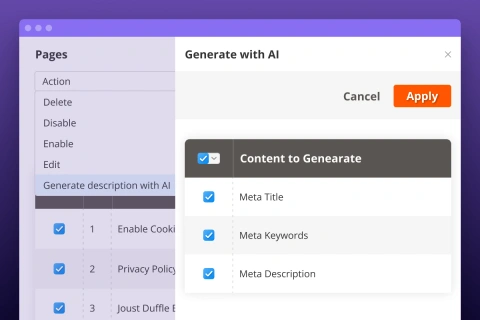
AI-Powered Content Generation (The GPT Integration)
The Pro version includes the Amasty AI Content Generator, which integrates directly with OpenAI’s models (GPT-4/4o).
- Bulk Description Creation: You can select 100 products and command the AI to “Write a 200-word engaging description focusing on the material and eco-friendly nature,” and it will populate those fields instantly.
- Metadata Auto-Fix: If the SEO Toolbar (see below) identifies a Meta Description that is too short or missing keywords, the AI can generate a revised version that meets the optimal character count and keyword density.
- Prompt Customization: Unlike basic AI tools, you can save “Prompt Templates” to maintain a consistent brand voice across all generated content.
On-Page SEO Health Toolbar
This is a real-time “Diagnostic HUD” that appears only for administrators on the storefront. It eliminates the need to look at source code or use third-party browser extensions.
- Visual Warnings: It provides a green/yellow/red status for critical elements:
- Indexation Status: Is the page currently set to noindex?
- Header Hierarchy: Does the page have more than one H1? Are the H2-H6 tags in the correct order?
- Open Graph Tags: Shows exactly how your product will look when shared on Facebook or X (Twitter).
- Schema.org Check: It verifies if your Rich Snippets (price, stock, rating) are being detected by crawlers correctly.
Pros & Cons of Amasty SEO Toolkit
What This Extension Does Well
- Holistic Integration: Having your redirects, sitemaps, and meta tags in one place prevents “extension bloat” and potential code conflicts between different vendors.
- Automation at Scale: For stores with 10,000+ SKUs, the template and AI features are not just “nice to have”—they are essential for survival.
- Modern Compatibility: Amasty has been proactive in ensuring this toolkit works with Hyvä (the high-performance frontend) and Mage-OS, making it a future-proof choice for modern developers.
Limitations to Keep in Mind
- No Off-Page Features: This tool is strictly for on-site and technical SEO. It will not help you build backlinks or manage your social media presence.
- Not an Analytics Suite: While it tells you what is wrong with a page, it doesn’t track your actual keyword rankings or organic traffic trends. You still need Google Search Console or Semrush for that.
- Cost Barrier: For a merchant with 20 products, $379/year is a steep price when manual optimization is still feasible.
Comparison With Competitors
When compared to the Mageplaza SEO Suite Pro, Amasty tends to lead in the realm of automation and AI. While Mageplaza offers excellent rich snippets and breadcrumb management, Amasty’s cross-linking engine and the new AI Content Generator provide a more “hands-off” experience for the merchant.
However, if price is the primary driver, BSS Commerce offers a modular Magento 2 SEO extension. You can buy exactly what you need (e.g., just the Sitemap or just the Meta Tag templates), which can be more cost-effective for smaller businesses that don’t need the full “Pro” powerhouse.
Best Use Cases for Amasty SEO Suite
- The “Growing Pains” Store: You’ve moved past 500 SKUs and find that you can no longer keep up with metadata or redirect management.
- The Migration Project: If you are migrating from Shopify or BigCommerce to Magento, the URL rewrite and redirect automation in this toolkit is a lifesaver for preserving your SEO.
- The International Store: Use the template features to manage SEO rules across multiple store views and languages simultaneously.
Summary: Is It Right For You?
Store Type | Best Fit? | Reasoning |
Small (<100 SKUs) | ⚖️ Okay | Might be “overkill”; consider BSS Commerce for individual modules. |
Mid/Large Catalog | ✅ Strong Fit | Automation will save you thousands in labor costs. |
SEO Beginners | ⚠️ Caution | The tool is powerful, but the sheer number of settings requires a learning curve. |
SEO Power Users | ✅ Excellent | Provides the granular control needed for advanced technical SEO. |
Final Verdict: The Amasty Magento 2 SEO Toolkit Pro is a gold standard for technical SEO automation. While the price point reflects its premium nature, the time saved on manual catalog management and the prevention of technical errors (like 404s and duplicate content) generally results in a high ROI for medium and enterprise-level merchants.