

As order volumes grow, manual order management quickly becomes a bottleneck in Magento 2. Tasks like updating order statuses, syncing systems, or migrating data consume time and increase errors.
This article explains how order import/export improves operational efficiency in Magento 2 by streamlining workflows, reducing manual effort, and supporting scalable operations. By automating these data movements, merchants can focus on strategy rather than repetitive administrative tasks.
In the early stages of an e-commerce business, managing a handful of orders per day through the Magento admin panel is manageable. However, as the business scales, the limitations of the default interface become apparent.
Manual entry is inherently slow and prone to human error. A single typo in a shipping address or an incorrect order status update can lead to customer dissatisfaction and increased support costs.
When a store handles hundreds or thousands of transactions daily, the “one-by-one” approach to order management creates a ceiling on growth. If you cannot process orders as fast as you receive them, your lead times increase and your reputation suffers.
Furthermore, manual management limits your ability to respond to market changes. If you need to update tax rules or shipping carriers across a thousand open orders, doing so manually is a logistical nightmare.
Automation becomes a necessity rather than a luxury for the modern merchant. Without a way to move data in bulk, your team remains stuck in a cycle of “busy work” that adds no real value.
To stay competitive, many businesses look toward a Magento 2 Import Export Order solution to bridge the gap between their store and their backend operations.
The ability to move order data in and out of the platform via CSV or XML files transforms how a business functions. It shifts the focus from individual record editing to high-level data strategy.
One of the primary ways order import/export improves operational efficiency in Magento 2 is through the automation of bulk updates. If you need to change hundreds of order statuses, manual editing is a waste of talent.
Consider the scenario of a shipping delay. If a carrier experiences a strike, you might need to update 2,000 orders with a new “Delayed” status and a custom comment for the customers.
Doing this manually through the admin grid would take a full workday for an employee. With a bulk import, the same task is completed in under five minutes, freeing that employee for higher-value tasks.
This speed is also vital during data migrations. Moving from Magento 1 to Magento 2, or from Shopify to Magento, requires moving years of sales history to keep customer accounts accurate.
A robust export and import tool ensures that every order, invoice, and shipment record is moved without losing the link between the customer and their transaction history.
This level of efficiency is vital for businesses that utilize TOP Magento 2 extensions to optimize product discovery and sales, as accurate data provides the insights needed for growth.
Manual data entry is the leading cause of “dirty data” in e-commerce. Whether it is a misspelled customer name or an incorrect SKU, these small mistakes ripple through the entire fulfillment chain.
Order import/export improves operational efficiency in Magento 2 by using standardized data formats. These formats ensure that information remains consistent across different software platforms.
When data is handled manually, the “copy-paste” method often leads to truncated addresses or missing apartment numbers. These errors lead to returned packages and extra shipping costs.
By exporting data directly into a shipping manifest, you ensure that the warehouse receives exactly what the customer typed during checkout. This precision reduces the “exception rate” in your logistics.
Consistency also matters for your financial records. If your accounting software shows different totals than your Magento store due to manual entry errors, reconciliation at the end of the month becomes a headache.
Using a bulk export ensures that the gross totals, tax amounts, and shipping fees match perfectly between systems, saving your accounting team dozens of hours every month.
Most Magento stores do not operate in a vacuum. They rely on Enterprise Resource Planning (ERP) systems for inventory and software like QuickBooks or Xero for accounting.
Order import/export improves operational efficiency in Magento 2 by acting as the bridge between these disparate platforms. It creates a unified ecosystem where data flows freely.
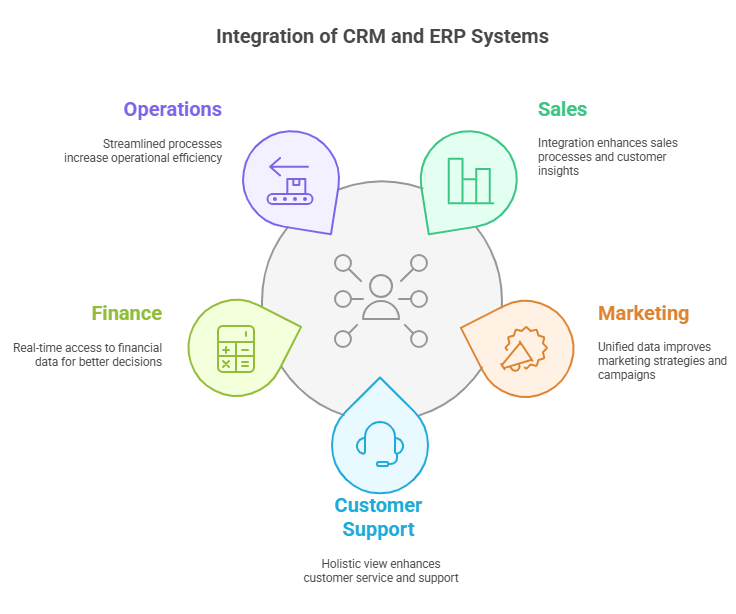
In a non-integrated environment, the marketing team might send a “Thank You” email for an order that was actually canceled in the warehouse, but not updated in the CRM.
By automating the export of order statuses from Magento and the import into the CRM, you ensure that the marketing team is always working with current data.
This streamlining also applies to inventory management. If an order is canceled in Magento, exporting that data to the ERP ensures the stock is immediately returned to the “available” pool.
Without this link, you risk “out-of-stock” errors where the website thinks an item is gone when it is actually sitting in the warehouse ready to be sold.
Efficient data exchange between these systems is what separates a professional e-commerce operation from a hobbyist store, allowing for much smoother cross-team communication.
Peak shopping seasons, like Black Friday or the holiday period, put immense pressure on operations. During these times, order volume can increase by 500% or more.
Order import/export improves operational efficiency in Magento 2 by allowing your team to keep up with the surge without hiring temporary workers for data entry.
Imagine having 1,000 orders waiting to be shipped. If each tracking number takes 30 seconds to copy from a spreadsheet into Magento, that is over 8 hours of work just for data entry.
With a bulk import tool, that entire list of 1,000 tracking numbers can be updated in a single upload taking less than a minute. This turns a full day’s work into a momentary task.
The speed of processing directly impacts customer satisfaction. Customers expect to receive a “Shipped” email the moment their package leaves the building.
Manual processing creates a delay between the physical act of shipping and the digital notification. Bulk imports eliminate this lag, providing a better experience for the shopper.
By saving this admin time, your team can focus on solving complex customer issues or optimizing the warehouse layout to further increase speed.
A scalable business is one that can handle more work without a proportional increase in costs. If you double your order volume, you shouldn’t have to double your staff.
Order import/export improves operational efficiency in Magento 2 by providing the infrastructure required for this type of non-linear growth.
Scalability is about removing friction. Every manual click in the Magento admin is a point of friction that slows down your business.
By moving toward a file-based or API-based order management system using import/export tools, you remove those clicks and replace them with efficient, repeatable processes.
This allows your business to grow into new markets or launch new product lines without worrying about whether the backend staff can handle the increased workload.
It also makes your business more resilient. If a key staff member who handles order entry is away, an automated or bulk-file process can be easily picked up by someone else.
Ultimately, scalability means that your technology does the heavy lifting, allowing your human talent to focus on creativity, marketing, and growth strategy.
While every store can benefit from better data handling, certain scenarios make these tools indispensable for maintaining high efficiency.
High-volume stores are the most obvious beneficiaries. When you are processing thousands of orders monthly, any manual step in the process represents a significant cost in time and money.
Multi-channel merchants also find immense value here. If you sell on Amazon, eBay, and your own Magento site, you need a way to consolidate all those orders for your warehouse.
Businesses going through a restructuring—such as a merger or a rebranding—often need to move large amounts of data between different store views or installations.
Without import/export capabilities, this would require manually recreating thousands of records, which is both expensive and prone to massive errors.
Finally, businesses that work with third-party logistics (3PL) providers rely on these tools to send order data to the warehouse and receive shipping updates in return.
The ability to export a clean CSV of the day’s orders to a 3PL and import the tracking numbers back into Magento the next morning is the backbone of outsourced fulfillment.
Order import/export is a practical operational tool that helps Magento 2 merchants reduce manual effort, improve accuracy, and scale efficiently. By automating bulk order handling and system integrations, businesses can maintain control as order volumes increase.
For growing Magento stores, import/export capabilities become a foundation for sustainable operational efficiency rather than just a technical convenience. It empowers teams to handle high-volume periods with ease and ensures that data remains accurate across the entire business ecosystem.
Embracing these tools allows merchants to move away from the friction of manual data entry and toward an agile future. By optimizing how data moves, you ultimately optimize how your business grows, ensuring long-term success in the competitive e-commerce landscape.
