Expert Tips for Using BSS Commerce Magento 2 B2B Extension package effectively
In the rapidly evolving landscape of B2B e-commerce, efficiency isn’t just a luxury, it is a survival requirement. B2B merchants often face a strategic decision between leveraging the native capabilities of Magento and extending functionality with a modular B2B package.
Unlike B2C transactions, where emotional triggers and simple checkouts reign, B2B purchasing is defined by complex decision-making, bulk requirements, and long-term contractual relationships. For Magento 2 store owners, the BSS Commerce B2B Extension Package has emerged as one of the most robust toolkits to bridge the gap between standard retail functionality and the specialized needs of wholesale.
To truly maximize the ROI of this suite, merchants must go beyond simple installation. They must architect a journey that mirrors the professional expectations of corporate buyers. This article provides an expert-level roadmap for effectively deploying and managing BSS Commerce B2B extensions to streamline operations and drive loyalty.
Pre-Installation & Strategic Setup
Success with any complex software suite begins long before the first line of code is executed. For the BSS Commerce B2B extension Magento, a disciplined preparation phase prevents technical debt and ensures a seamless transition.
Define Your B2B User Archetypes
Before toggling settings, outline what your specific B2B customers need. Are they “Self-Service Buyers” who want a fast, Amazon-like reordering experience? Or are they “Corporate Managers” who require multi-user accounts and credit limits?
- Actionable Tip: Create a “B2B Requirements Map.” If your buyers typically order by SKU, prioritize the Wholesale Fast Order configuration. If they negotiate every deal, focus on the Request for Quote workflow.
Rigorous Compatibility & Theme Audits
BSS extensions are designed to be compatible with popular themes like Porto or Hyvä, but the highly customized nature of Magento means conflicts are always possible.
- Check Dependencies: Many BSS modules require a “Base” or “Core” module. Ensure these are installed first.
- Patch Verification: If you are using a non-Luma theme, contact BSS support for specific “Theme Compatibility Patches” often required for complex elements like the Configurable Product Grid Table View.
The Staging Environment Mandate
Never install B2B extensions directly on your production site. The B2B suite touches sensitive areas of Magento: the customer grid, pricing logic, and checkout.
- The Workflow: Install via Composer in a staging environment $\rightarrow$ Run php bin/magento setup:upgrade $\rightarrow$ Perform a full regression test of the checkout $\rightarrow$ Deploy to Live.
Key Extension Features of Magento 2 B2B Package to Leverage
The BSS package is extensive. To avoid “feature bloat,” focus on these high-impact modules that transform the core buying experience.
Advanced Registration & Login Management
Default Magento treats every user the same. To act like a B2B powerhouse, you must gate your experience.
- Custom Attributes: Use the B2B Registration extension to add fields for VAT/Tax ID, Company Website, or Business Type. This allows you to vet leads before they see your wholesale pricing.
- The “Force Login” Strategy: For exclusive distributors, use the Force Login feature to hide your entire catalog or specific categories from public view. This protects your pricing strategy and creates an “exclusive club” feel for your partners.
High-Velocity Order Processing
B2B buyers are often replenishment-driven. They don’t want to browse; they want to buy.
- Wholesale Fast Order: Configure a dedicated CMS page with a search-by-SKU form.
- CSV Uploads: This is a “game-changer” for industrial suppliers. Allow customers to upload a simple .csv file with two columns, SKU and Quantity, to populate their cart in seconds.
- Configurable Grid Table: Instead of selecting one size or color at a time, enable the grid view so buyers can enter quantities for all 10 variations of a product at once.
At scale, these fast-order workflows must be paired with an efficient bulk order processing extension in the Magento admin to prevent fulfillment bottlenecks.
Pricing, Payments, and Credit Systems
Pricing in B2B is rarely static. The BSS suite allows you to move beyond basic Magento tier pricing.
- Company Credit & POs: Enable the Company Credit extension to allow trusted partners to “buy now, pay later.” You can set individual credit limits (e.g., $\$5,000$ for a new client, $\$50,000$ for a legacy partner) and allow specific customers to exceed these limits during peak seasons.
- Tiered Pricing for Groups: Automatically apply discounts based on the customer group (e.g., “Gold Wholesalers” get $15\%$ off MSRP).
Human-Centric Sales Management
Even in digital commerce, relationships matter. The Sales Rep extension allows you to bridge the gap between automated systems and personal service.
- Assignment: Assign specific sales reps to large corporate accounts. When the customer logs in, they see their rep’s contact info.
- Order-on-Behalf: Allow sales reps to log in and create orders for their clients, which is essential for phone-based support or closing deals during field visits.
Advanced Strategies for Efficiency
Once the basics are live, use these advanced configurations to truly optimize the “Expert” experience.
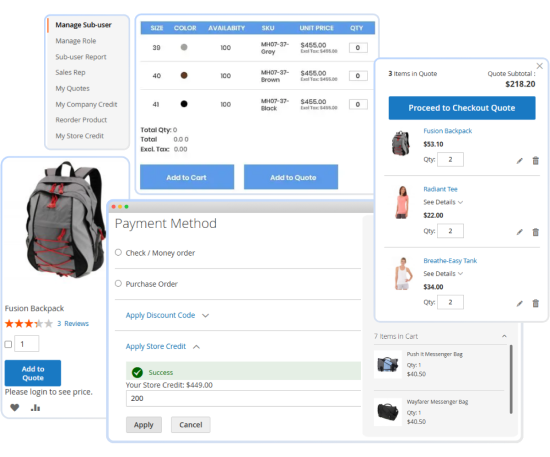
Combine Magento Extensions for a Holistic Workflow
Don’t view modules in isolation. Integrate them to solve complex problems:
- The “Negotiation” Loop: Combine Hide Price with Request for Quote. If a customer is not logged in, they see “Call for Price.” Once logged in, they see an “Add to Quote” button. This forces a conversation and allows for custom pricing based on volume.
- Shipping Constraints: Use the Minimum Order Amount extension alongside your B2B package to ensure that wholesale pricing is only available for orders large enough to justify your shipping overhead.
Optimize the Checkout Journey
Cart abandonment happens in B2B too, usually due to friction.
- Store Credit for Refunds: Instead of issuing complex bank reversals, refund canceled orders to Store Credit. This keeps the capital within your ecosystem and speeds up the “re-buy” process for the customer.
- Requisition Lists: Encourage users to save multiple “standard” carts (e.g., “Monthly Office Supplies” vs. “Quarterly Inventory”).
Best Practices for Long-Term Success
Deploying a B2B suite is a “marathon, not a sprint.” To ensure your system remains performant, secure, and user-friendly as your wholesale volume scales, follow these detailed best practices.
Performance Optimization & Indexing
B2B extensions often introduce complex logic to the Magento core, especially regarding pricing and customer attributes. Without optimization, your site speed can suffer.
- Manage Large Price Rules: If you have thousands of custom prices for different customer groups, ensure you are using Redis for backend caching. This prevents the system from recalculating prices on every page load.
- Indexer Maintenance: B2B modules rely heavily on the customer_grid and catalog_product_price indexers. Set these to “Update by Schedule” in your Magento admin. This ensures that when a sales rep updates a customer’s credit limit or price group, the site doesn’t “hang” while reindexing the entire database.
- Flat Catalog Considerations: While Magento 2 generally moves away from flat catalogs, some BSS modules perform better with specific indexing configurations. Always consult the BSS documentation for your specific version.
Security & Verification Protocols
B2B sites are prime targets for spam and unauthorized access to wholesale pricing.
- Two-Factor Verification: Use the B2B Registration extension to require a Tax ID (VAT/EIN) and a physical business address. Implement a manual approval process where a site admin must verify these credentials before the account is activated.
- Bot Prevention: Enable Google reCAPTCHA on the B2B registration and “Request for Quote” forms. This prevents your sales reps from being buried under thousands of fake leads generated by bots.
- Permission Scoping: Use Magento’s “User Roles” to limit which of your internal staff can see sensitive B2B data. For example, a “Warehouse Manager” should see orders but shouldn’t have the permission to modify a customer’s Company Credit limit.
Data-Driven Sales Management
Don’t let the data generated by these extensions go to waste.
- Monitor Credit Utilization: Regularly review the Company Credit dashboard. If a loyal customer is consistently hitting $95\%$ of their credit limit, have a sales rep proactively reach out to offer a limit increase. This is a powerful, data-driven touchpoint that builds trust.
- Quote Response Time: Set a Key Performance Indicator (KPI) for your sales team to respond to Request for Quotes (RFQs) within 4 business hours. B2B buyers often send quotes to multiple vendors; the first one to respond with a professional PDF usually wins the contract.
- Abandoned Quote Analysis: Treat abandoned quotes like abandoned carts. Use the BSS Quote module to see which products are frequently quoted but never converted, this may indicate that your “wholesale” pricing isn’t competitive enough for those specific SKUs.
Continuous UX Testing (The “Buyer’s Journey”)
The technical setup might be perfect, but the user experience must remain intuitive.
- Mobile Responsiveness for Fast Orders: Many B2B buyers place orders on tablets or phones while in a warehouse. Test the Wholesale Fast Order form on mobile devices to ensure the search-as-you-type and SKU input fields are large enough to be “thumb-friendly.”
- Clear Communication: Customize the “Order Success” and “Registration Received” email templates. Instead of the generic Magento text, include details like: “Your application is being reviewed by our team. Expect an approval within 24 hours.” This reduces customer anxiety and reduces “Where is my account?” support tickets.
- User Feedback Loops: Every six months, ask your top 10 B2B customers to spend 5 minutes giving feedback on the ordering process. They will often spot friction points, like a slow CSV upload or a confusing credit limit display, that your internal team might miss.
Version Control & Update Strategy
Magento and BSS Commerce both release regular updates.
- The “One-at-a-Time” Rule: When updating your B2B package, do not update Magento itself and the extensions simultaneously. Update the BSS extensions first, verify them in staging, and then proceed with the Magento core update.
- Backup Before Changes: Before any configuration change in the B2B suite (like changing the logic for “Hide Price”), perform a full database backup. Because B2B settings are deeply interconnected, a small change in “Customer Group” permissions can have unexpected ripple effects across the catalog.
- Clear Communication: Customize the “Order Success” and “Registration Received” email templates. Instead of the generic Magento text, include details like: “Your application is being reviewed by our team. Expect an approval within 24 hours.” This reduces customer anxiety and reduces “Where is my account?” support tickets.
- User Feedback Loops: Every six months, ask your top 10 B2B customers to spend 5 minutes giving feedback on the ordering process. They will often spot friction points, like a slow CSV upload or a confusing credit limit display, that your internal team might miss.
Conclusion: Driving Wholesale Growth
The BSS Commerce Magento 2 B2B Extension package is your blueprint for a professional, scalable wholesale portal. By streamlining bulk ordering, personalizing pricing, and automating credit management, you bridge the gap between complex B2B requirements and a seamless digital experience.
Implementing these expert strategies ensures your store does more than just sell, it builds lasting partnerships through efficiency and trust. Focus on a frictionless buyer journey today to secure your competitive advantage in the evolving B2B landscape.