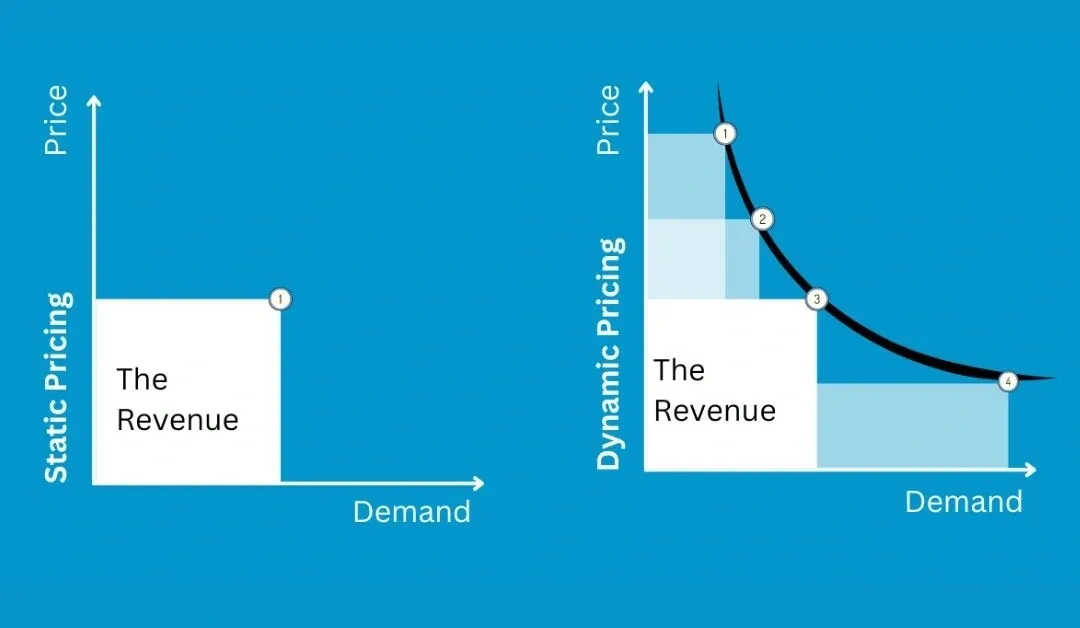
In today’s fast-moving e-commerce world, keeping your prices the same all the time is a recipe for falling behind. Customer habits change quickly, and competitors are always shifting their strategies. For business owners using Adobe Commerce, staying ahead means using agile pricing that reacts to the market.
This guide looks at the world of Magento 2 extensions for dynamic pricing rules. We will provide a clear plan for setting up automated pricing that helps you protect your profit margins and keep customers coming back. By learning how to go beyond the basic features of Magento, you can build a store that stays competitive and profitable in any situation.
Dynamic pricing is simply the process of changing your product prices automatically based on specific rules or real-time information. Instead of every customer seeing the exact same price for every item, the price “moves” based on who is looking at it or when they are shopping.
These rules act like a smart brain for your store. When a person visits a product page or puts an item in their basket, the pricing engine checks several things:
Customer details: Are they a new visitor or a VIP member?
Location: Where in the world is the shopper located?
Inventory levels: How many items do you have left in stock?
Time of day: Is there a special holiday or a flash sale happening right now?
Using Magento 2 extensions for dynamic pricing rules allows you to set these conditions once and let the system do the work. This saves hours of manual updates and ensures your prices are always exactly where they need to be.
Limitations of native Magento 2 pricing
Magento 2 is a powerful platform, but its “out-of-the-box” pricing tools are quite basic. Most stores quickly find that the standard features cannot handle the complex needs of a growing business.
The main issue is that native Magento rules are often “all-or-nothing.” They don’t allow for much nuance. For example:
Store view limitations: By default, Magento makes it hard to have different base prices for the same product across different store views if they share the same website. This is a huge hurdle for global brands, which is why many use theMagento 2 Multiple Store View Pricing extension to solve this specific problem.
Lack of external data: Standard Magento cannot look at what your competitors are charging or calculate prices based on complex shipping costs.
Limited tax logic: Handling taxes across different countries is a major headache. High-volume sellers often look for the TOP Magento 2 extensions to handle complex tax rules to make sure the price shown on the screen is always legally correct and includes the right amount of VAT or sales tax.
Regional challenges: Since shipping costs vary so much, many practitioners search for the TOP Magento 2 extensions for regional pricing rules to adjust the product price based on how far it has to travel to reach the customer.
Common types of dynamic pricing rules
To get the most out of Magento 2 extensions for dynamic pricing rules, you should understand the four main ways these rules are used.
Customer group and segment pricing
This is all about personalizing the price for the individual shopper. You can treat different types of customers differently to build loyalty:
Wholesale vs. Retail: Offer lower prices to businesses that buy in bulk.
VIP Rewards: Automatically give your best customers a 5% discount on everything.
New Customer Deals: Show a lower price only to people visiting your site for the first time to encourage that first purchase.
Quantity and volume-based pricing
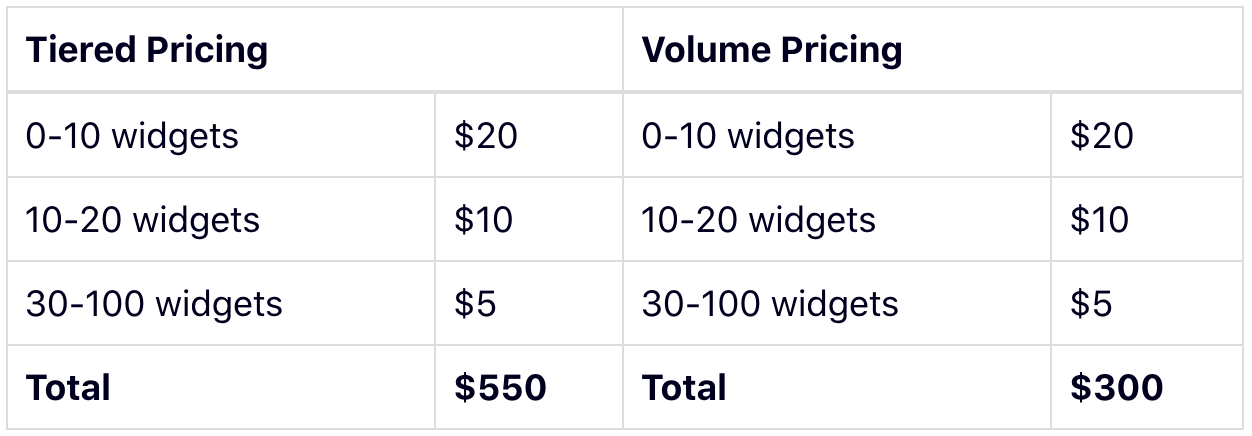
Commonly called “tier pricing,” this rewards people for buying more. While Magento has a basic version of this, advanced extensions allow you to do much more:
Mix and Match: Give a discount if a customer buys any 5 items from a specific category, rather than 5 of the exact same item.
Step Pricing: Set the price to drop at 10 units, then drop again at 50 units, and so on.
Bundle Logic: If a customer buys a camera and a lens together, the price of the lens drops automatically.
Cart and promotion-based pricing
These rules don’t show up until the customer is ready to pay. They are great for closing the deal:
BOGO Deals: Buy one, get one free logic that triggers automatically.
Free Gift: Add a specific item to the cart for $0 if the total spent is over a certain amount.
Payment Discounts: Offer a small discount if the customer chooses a cheaper payment method, like a direct bank transfer instead of a credit card.
Time-based and scheduled pricing
This is perfect for sales that have a strict start and end time:
Flash Sales: Automatically drop prices for a 2-hour window on a Friday night.
Seasonal Shifts: Schedule your entire Black Friday pricing weeks in advance so you don’t have to stay up until midnight to change prices manually.
Happy Hour: Offer lower prices during your slowest hours of the day to boost traffic.
What to look for in Magento 2 dynamic pricing extensions
Not all extensions are created equal. When choosing Magento 2 extensions for dynamic pricing rules, keep these three factors in mind.
Rule flexibility and conditions
A good extension should let you create “If/Then” scenarios that are as simple or complex as you need. Look for tools that can use:
Product Attributes: Brand, color, material, or weight.
Stock Levels: Lower the price automatically when you have too much stock, or raise it when stock is low.
Customer History: Has this customer spent more than $1,000 in the last year?
Compatibility and performance
Every time a page loads, the system has to “think” about what price to show. If the extension is built poorly, it will make your website slow.
Cache Friendly: Ensure the extension works with “Varnish” or “Full Page Cache.”
Conflict-Free: It should not break your checkout or your shipping calculator.
Speed: The price should appear instantly without the customer seeing a “loading” icon or a jump in the price.
Admin usability and control
If you have 500 rules, you need a way to manage them without getting a headache.
Price Preview: The ability to “test” a rule in the admin panel to see what the final price would be before the customers see it.
Bulk Updates: Being able to change 100 rules at once rather than clicking into each one individually.
Labels: The ability to add internal notes to rules so you remember why you created them.
Main categories of Magento 2 dynamic pricing extensions
There are different tools for different jobs. Here are the main types of Magento 2 extensions for dynamic pricing rules.
Catalog pricing rule extensions
These change the price the customer sees while they are browsing your shop.
Impact: Changes the price on the category page and the product page.
Best For: Store-wide sales, seasonal discounts, and group pricing.
Cart price rule extensions
These apply changes only once the item is in the shopping basket.
Impact: Changes the “Grand Total” at checkout.
Best For: Coupon codes, free shipping offers, and “Buy X Get Y” deals.
B2B and contract pricing extensions
This is essential if you sell to other businesses.
Impact: Allows for unique prices for specific companies.
Best For: Negotiated contracts where Company A pays $10 for an item, but Company B pays $12 because they have a different agreement.
Advanced rule engine extensions
These are for stores that need total control. They often use mathematical formulas to decide the price.
Example: Price = Cost + 20% + $5 shipping fee.
Best For: Stores with huge inventories and very thin profit margins where every cent counts.
How dynamic pricing extensions work in practice
To use these tools properly, you need to understand how Magento calculates the final number.
Rule priority and price calculation logic
What happens if two rules apply to the same product? You have to set a “Priority.”
Priority Numbers: Usually, 0 is the highest priority. If two rules match, the one with the higher priority wins.
Discard Subsequent Rules: This is a setting that tells the system: “If this rule matches, stop looking for any other rules.” This prevents customers from getting two discounts at the same time by mistake.
Stacking: Sometimes you want rules to stack (like a 10% sale plus a $5 coupon). You must configure the extension to allow this.
Conflicts between pricing rules
Conflicts are the biggest danger. If your rules are not set up carefully, you might accidentally sell a product for $0 or lose money on every sale. Generally, the system follows this order:
Special Price: The fixed “Sale Price” you set on the product page.
Tier Price: The discount based on how many they buy.
Catalog Rule: The dynamic rule based on the customer group or location.
Cart Rule: The final discount applied at the very end of the checkout.
Most advanced Magento 2 extensions for dynamic pricing rules come with a “Conflict Log.” This is a report that shows you when two rules are fighting over the same product, so you can fix it before any customers notice.
Strategic implementation of dynamic pricing
Don’t try to do everything at once. Setting up dynamic pricing is a marathon, not a sprint. Follow these simple steps:
Step 1: Start Simple. Begin with basic rules like “10% off for logged-in customers.” This helps you learn how the extension works without much risk.
Step 2: Test Everything. Use the “Preview” tool in your extension to make sure the math is correct.
Step 3: Check Your Speed. After turning on a new rule, browse your site like a customer. If it feels slow, you might have too many complex rules running at once.
Step 4: Audit Monthly. Every month, look at your sales. Are your dynamic rules actually making you more money? If a rule isn’t helping, turn it off.
Managing your profit margins is the most important part. If you automate your pricing, you must ensure your “Base Cost” is always updated in the system. If your costs go up but your dynamic rules keep prices low, your profits will disappear.
Conclusion
Using Magento 2 extensions for dynamic pricing rules is one of the smartest moves you can make for your online business. It moves your store away from old-fashioned, static pricing and into a future where every price is calculated to be as competitive as possible.
By picking the right tools and setting up clear rules for different customer groups and locations, you can protect your profits while giving your shoppers a great deal.
As technology improves, these tools will only get smarter. Starting today ensures that your business is ready for the next level of e-commerce, helping you grow faster and more efficiently than ever before.